Securing Oracle APEX Apps: Report Row Actions


Oracle APEX is a powerful and scalable tool for building efficient and secure applications. Over the last 20 years more than 21 million applications have been created using its tools and software. That is a lot of applications, and more importantly, a lot of developers.
With so many developers comes many different levels of experience and education. During development work processes change, developers change code, APEX is updated and new vulnerabilities are found. Even with the best intentions, things can be overlooked, ignored or misunderstood.
At RADAPEX we are always looking inward at our own and our clients applications, reviewing code and practices to make our best efforts to ensure security and safety. In a previous blog post Nick Marshall examined Client Side APEX Vulnerabilities and discussed not only their potential impact but also how common they can be. Developers and users often implicitly trust the ‘client-side’, because after all, they already have application access, so what could go wrong?
As it turns out, a lot.

Insider Threats
Insider threats are a growing factor in application security. With bad actors, phishing attempts, insecure entry points and all manner of other motivations, users with internal access to an application can and do take malicious actions against companies and their data. In Cybersecurity Insiders’ 2025 Insider Risks Report they found 77% of companies had experienced insider-driven data loss in the past 18 months.
Oracle APEX is well equipped to help businesses deal with these threats and vulnerabilities; Alex Turnbull discussed ‘Insider Threat and Oracle APEX’ on our blog, and outlined the most common threats and the tools Oracle provides to help developers mitigate them, however as we discussed earlier, there are a multitude of reasons these can be overlooked, under reported, under valued in their impacts, or simply ignored by developers and product owners alike.
So what do we mean by this? What is a common example of a security problem we frequently see in application development, and how can it be resolved?
Passing ID’s to Processes

Whether you are a new or experienced developer, the actions above will probably be familiar to you, but issues can arise when you are using id’s to manage data in report rows. It doesn’t have to be a delete; changing status, exporting a record, anything that is happening ‘on click’ from a report can be a major vulnerability.
This is a common trap for developers to fall into, many developers and clients don’t want to have too many ‘clicks’ or steps for a user to make an action on their data, so they add the functionality directly to the report itself.
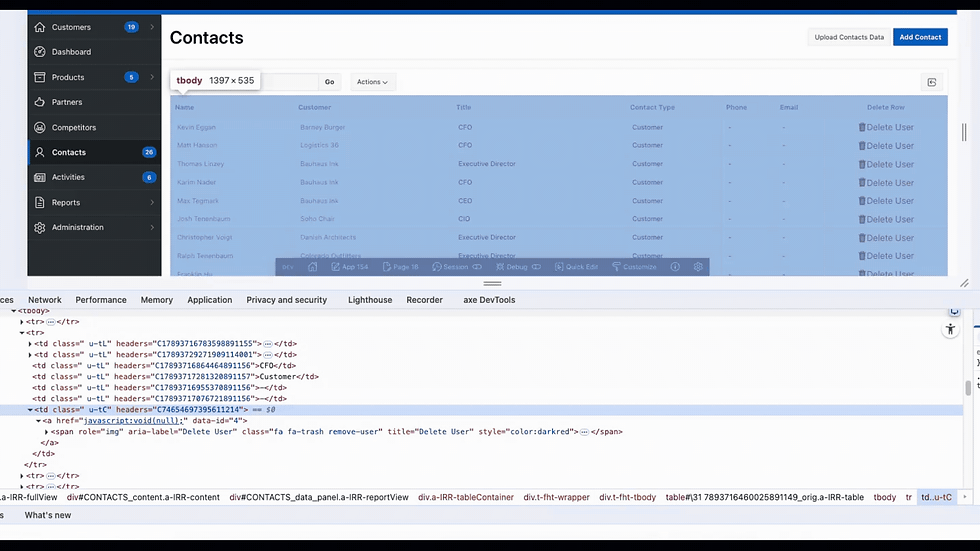
So what's the problem with that? As you can see here, it is trivial for an end user to change the id being submitted, allowing all kinds of unwanted behaviour to occur, including affecting rows they do not have access to in the original report. For example, if a user's view is limited to departments, or access levels, they could easily insert an id from outside the scope of their access and perform the type of action the limits or access levels are trying to prevent.
So how can this be done safely?
The simple answer is to not do it at all. Instead direct your users to a separate or modal page via an ‘Edit’ button and protect this page with a checksum to prevent the URL being manipulated.
Unfortunately, this is not always in line with how a client wants an application to behave, so as a developer we sometimes have to explore other options.
Unique Keys
One option can be to generate a unique key for each row as it is selected from the table; create a checksum function to generate a unique key for each row, concatenating app_user and app_session with a unique string, then call this function when selecting the data from the table, giving you something other than the id’s to use for referencing the rows.

Then instead of passing the id to the page process, you can pass and validate the checksum instead. These checksums are now much too long to guess, and have an added benefit that you no longer need to expose table ids to users, preventing the database tables from being easily enumerated.
This method does require some JavaScript on the back-end, you will need an Ajax Callback from the dynamic action to call a page process, and construct a checksum for comparison with the actual row value. You can then generate proper user feedback as required.

Processing Validation
Another option, and maybe the simplest to implement, is to check the id is available to the end user at the point of processing. In APEX this is relatively simple, pass the id to a variable and check if this id can be found in the same query used to build the report, if it is found you can process as normal, if it is not, throw an exception. With a little further coding you can customise the error message displayed to the user, giving a smoother user experience.

Don’t trust your inputs
Whichever method you choose to implement, the key point to remember is that you cannot implicitly trust data submitted from reports. The data must be verified or protected before it is processed, anything exposed to the end user can potentially be manipulated to commit changes beyond the scope of what was intended by the developers.

To many developers this behaviour and resolution will be familiar, but securely processing row actions on reports is a common problem, and is often overlooked in testing and development. With a little awareness of the problem it is quite simple to resolve, and add an extra layer of security and data protection to your application.