Diagnose Network Connection Issues Quickly with AWS Reachability Analyzer

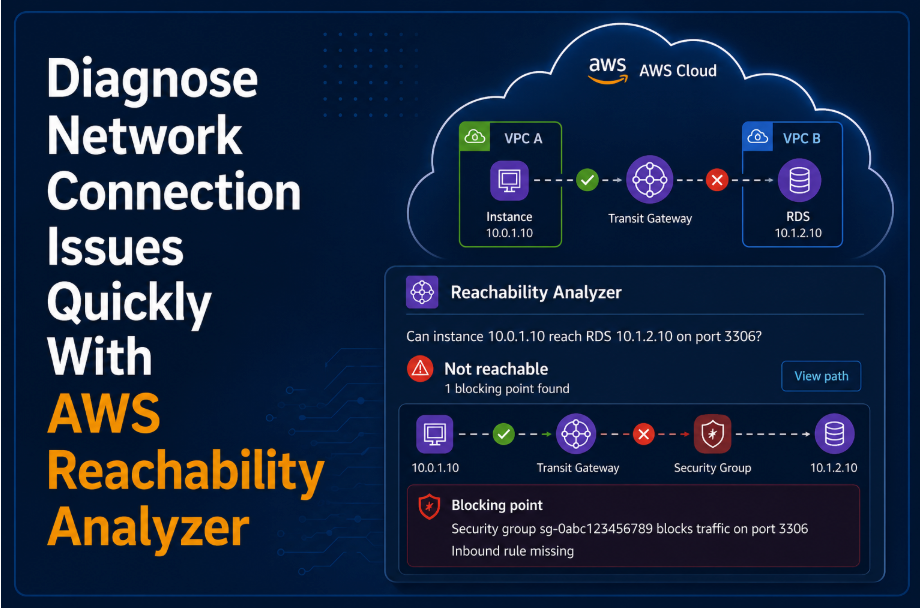
Anyone who has spent an afternoon chasing multiple 4xx connection errors across a maze of security groups, route tables and NACLs knows how painful network troubleshooting on AWS can be. A single missing route or an overly restrictive security group rule can be nearly impossible to spot by eye, especially in a VPC with multiple different traffic routes.
AWS Reachability Analyzer was built to solve, or at least to make you aware of gaps in connections between resources. Will be showing a basic guide on what the Reachability Analyzer does and a brief example of how to use it to test connections between resources.
What Is AWS Reachability Analyzer?
AWS Reachability Analyzer is a configuration analysis tool inside Amazon VPC that checks whether network traffic can reach from a source resource to a destination resource. It tells you one of two things:
The path is Reachable.
The path is Not Reachable, if this is the case, this will show exactly which component is blocking it (Security Group Rule, Route Table entry, NACL Rule, etc).
The key thing that makes it different from a typical connectivity test:
It doesn't send any actual packets.
Instead, Reachability Analyzer builds a model of your network configuration (routes, security groups, NACLs, gateways, etc) and mathematically determines whether traffic would be able to flow between two points based on that configuration. This means it's safe to run against production environments, since there's zero risk of side effects like triggering IDS alerts or generating real network load.
What Resources Can You Analyze?

You can specify a wide range of resources as a source or destination, including:
Elastic Network Interfaces (ENIs) and EC2 instances
Internet Gateways and Virtual Private Gateways
Transit Gateways and Transit Gateway Attachments
VPC Peering connections
VPC Endpoints and VPC Endpoint Services
Network Firewalls and Gateway Load Balancers
Arbitrary destination IP addresses, including ones outside AWS
You can also narrow to a specific source and destination port, which is useful when you only want to target a specific port from a specific range of requests.
Why Would You Use It?

A few common use cases where Reachability Analyzer earns its keep:
Troubleshooting Connectivity Issues: An application/service can't reach a database, for example. Instead of manually tracing route tables and security groups, let the tool find the misconfiguration.
Connection Verification: Is your networking infrastructure configured as intended? Making sure that intended services can only reach what they are supposed to and unnecessary connections routes are restricted.
Change Validation: After a change to the networking configuration, re-run a saved analysis to confirm connections are still as intended.
Security Auditing: Verify that a resource is not reachable from the internet when it shouldn't be, making sure that specific services are locked down and can only be accessed through approved sources.
Cross Account Networking Diagnostics: Trace connectivity between resources that live in different AWS accounts within the same AWS Organization.
Pricing
Always something to check before trying any shiny new AWS service!
In short, for each path run through the Reachability Analyzer will cost approx $0.10 (7.4p GDP).
Saved paths in the Reachability Analyzer do not incur any costs, but if they are re-run then the cost will occur. This is another reason why I stayed away from showing this in the CLI and going down the automation path. This could be an easy way to rack up costs if you have a pipeline that runs a path for each new merge to main (for instance).
Check out the Amazon VPC Pricing Page for further information and visualising costs ahead of time try to use the AWS Pricing Calculator to gain an estimate.
How to Use Reachability Analyzer (Step-by-Step)

Here's a walkthrough using the AWS Console, I would say this is a popular use case for testing the connection routes. It is definitely a use case to be used through the CLI and automated through a pipeline. But for the high level overview of this blog, I will keep it console based.
Step 1: Open Reachability Analyzer
In the AWS Console, search for Network Manager (VPC Feature), then select Reachability Analyzer, under Monitoring and Troubleshooting
Step 2: Create a path
Select Create and analyze path. You will need to define:
Source Type and Source: An EC2 instance or network interface.
Destination Type and Destination: Another EC2 instance, an internet gateway or a raw IP address.
Source/Destination Port (optional): Restrict the analysis to a specific port, such as 443 or 22.
Protocol: TCP or UDP.
For the Source and Destination, once you have selected a type, it will show all the IDs of the instances you can select. Note that, it will only show the IDs, so be sure you know which ID is referring to which instance.
Give the path a descriptive name (e.g., `ec2-web-app-to-rds`) so you can find and re-run it later.
Step 3: Run the analysis
Click Create and analyze path. Reachability Analyzer will process the configuration model, this usually takes under a minute to complete. Will return one of two results:
Reachable: Traffic can flow from source to destination.
Not Reachable: Traffic is blocked via a certain point and cannot path to the target destination.
This is the basic information that the Reachability Analyzer will give you, and can be enough if you get the output you are wanting (yes, this service can communicate with another service as intended).
Under the Analyses section, it will show the path the communication will take from the source to the requested destination. It will show what Network Security Controls will be hit on during this path, if the Reachability Analyzer returns Not Reachable it will show which component has not allowed access (plus a description on why it has been denied).
Step 4: If Not Reachable Fix and re-run
Once you've identified the blocker, as mentioned the report will show where the blocker is. Just a case of adding the rule to the component as needed and then re-run the same saved path to confirm it's now reachable.
Reading the Results Effectively
A few tips for interpreting output:
Reachable: Doesn't guarantee traffic will actually succeed at runtime, it means the current configuration will allow it. Application-level issues (e.g. the destination service isn't listening on that port) aren't something that Reachability Analyzer will catch, since it doesn't send real packets.
The Analysis Explorer: Is really useful for showing the flow of information in the account, and can be used to explain/show team members to the network topology.
Saved Paths: Can be re-run any time, which makes them a good lightweight regression check/testing after infrastructure changes.
Wrapping Up
AWS Reachability Analyzer turns a manual process of tracking network infrastructure routes into a few clicks in the console, to give easy to use, visual and repeatable results of network configuration traffic.
Whether you're validating a new network design in development, troubleshooting connectivity issues or auditing for unintended internet exposure. AWS Reachability Analyzer is one of the highest-leverage low-cost tools in the VPC toolkit.
If you're managing anything beyond a trivial VPC setup, it's worth saving a handful of critical paths (e.g., app-to-database, app-to-internet, cross-account links etc) and re-running them as needed as part of network configuration changes.
At RADAPEX we have written other blogs in a networking capacity. What is a VPN and Why Do Most Enterprise Organisations Use Them? & Why Cloudflare has changed the way I build infrastructure. These are helpful reads for real world connections from AWS that would benefit from using AWS Reachability Analyzer.